Robotics Specialization, University of Pennsylvania, Coursera

I mentioned in my last post that I was registered for the Coursera Robotics Specialization offered by the University of Pennsylvania. Now that several months have past I have finally completed all six courses in the Specialization.

The specialization was great overall, but did take considerable time over about 6 months. Each course was around 4-5 weeks long,  and took on average something about 10-12 hours a work per week (including all the lecture videos, quizzes and programming assignments). Some of the material was definitely a review from classes I took in college, however, some of the material was brand new to me.

The final class was a capstone project that involved pulling together concepts from the previous 5 classes to build a real physical robot. Since I love building real robots, I was quite thrilled. I was curious how the grading system would handle students building their own robots at home, and was surprised by the rather clever system Coursera uses. Each student submits a video of their robot doing whatever the assignment requires, and then this video is graded by at least three other students in the class who have also submitted a video for review. Below I’ll are the videos I submitted for grades in the capstone class:

This video was used to demonstrate that I built my robot properly, including wiring, soldering, power supplies, motor controller, etc.

This video demonstrates that I had properly calibrated and configured the robot’s front facing camera, and written a controller that allow the robot to follow an April Tag.

This video demonstrates (using a simulator) that I had properly written an Extended Kalman Filter (EKF) for State Estimation. (The outline robot represents the estimated state and the blue robot represents the actual state).

This was the final video for the final week of the capstone class. In this video we see that the robot plans a path from its initial position to a goal position, maneuvers through a field that includes obstacles and is able to do so because it has an accurate estimate of its state (position) even when it cannot see the April Tags (which are used for localization).


The certificates I earned for the specialization and individual classes can be seen here.

Auto-generated Arduino Code and Randomness

I am aware that I haven’t posted anything new for a few days now, and that is simply because I’ve been making too much progress to slow down and write about what’s going on. All in all the auto-generated code portion is essentially complete. I have added some functionality to allow the generated code to also include comments  which make the if/else  branch structure nearly as easy to read and follow as the graphical tree generated in Processing. The idea is for future students to make trees by hand and compare their work to the generated code, or to simply take the generated code and write about how and why it works or to possibly implement a task with an Arduino that will require a decision tree to make choices. The comments amount to explaining what the numbers correspond to in the if/else branches and what the decisions are and why.

In addition to adding commenting to the the auto-generated code I decided to also add the random number generation that was occurring in Processing to the Arduino code. In general the decision tree attempts to traverse down a given branch gaining information the whole time and reducing entropy to zero, at which point there is only one option left, the decision. However, it is possible for a decision branch to check all the attributes and still be unsure (not yet at zero entropy). If this occurs my decision tree randomly chooses a leaf node to place on the end of the branch (if there were no training examples on this branch) or else randomly chooses a weighted leaf node to place on the branch (if there were training examples on this branch). What this means is, if a branch has never occurred in training then the decision is randomly made (because there is not enough data to make an inference), and it should be correct 1/n*100% of the time, where n is the total number of possible decisions. However, if there were examples on that branch then the random choice is weighted in favor of examples that have occurred more often. For example if in training there were examples for a given non-zero entropy branch of a, a, b then the decision a should be chosen twice as often as decision b.

I have chosen to allow non-zero entropy random branches to exist in my decision tree implementation because in general some randomness can be desirable in mobile robots and other applications with noisy data that can be prone to local minima. For this reason I have chosen to move the random decision generation to the Arduino. If the random choice was made in Processing then for the duration the tree is loaded on the Ardunio the same decision will always be made for that branch. With the random number generation on the Arduino it has the ability to make different decisions each time an undetermined condition occurs. Further testing will be necessary to determine if this design choice is valid. For now I will leave you with some of the generated code with comments and random number generation included.

/* play_tennis decision Tree file for Arduino	*/
/* Date: 20 Feb 2012					*/
/* Time: 14:50:24						*/

#ifndef play_tennis_H
#define play_tennis_H

#if defined(ARDUINO) && ARDUINO >= 100
#include "Arduino.h"
#else
#include "WProgram.h"
#endif

// 	Output (Decision):
// play_tennis	levels: 0 = No 1 = Yes
// 	Input (Attributes):
// Outlook	levels: 0 = Overcast 1 = Rain 2 = Sunny
// Temp	levels: 0 = Cool 1 = Mild 2 = Hot
// Humidity	levels: 0 = Normal 1 = High
// Wind	levels: 0 = Weak 1 = Strong

int play_tennis(int Outlook, int Temp, int Humidity, int Wind, int random_seed){
	randomSeed(random_seed); // seed the psuedo random number generator
	if(Outlook == 0){	// Outlook == Overcast?
		return 1;	// play_tennis = Yes
	}
	else if(Outlook == 1){	// Outlook == Rain?
		if(Wind == 0){	// Wind == Weak?
			return 1;	// play_tennis = Yes
		}
		else if(Wind == 1){	// Wind == Strong?
			return 0;	// play_tennis = No
		}
	}
	else if(Outlook == 2){	// Outlook == Sunny?
		if(Humidity == 0){	// Humidity == Normal?
			if(Temp == 0){	// Temp == Cool?
				return 1;	// play_tennis = Yes
			}
			else if(Temp == 1){	// Temp == Mild?
				return 1;	// play_tennis = Yes
			}
			else if(Temp == 2){	// Temp == Hot?
				if(Wind == 0){	// Wind == Weak?
					return random(2);	// play_tennis = random choice
				}
				else if(Wind == 1){	// Wind == Strong?
					int random_choices[] = {0, 1};
					return random_choices[random(2)]; // play_tennis = weighted random choice
				}
			}
		}
		else if(Humidity == 1){	// Humidity == High?
			return 0;	// play_tennis = No
		}
	}
}

#endif

Speech Recognition and Decision Trees in Processing

So, I’ve been hard at work, sometimes so much so that I have neglected to update and record my progress.

Today I spent some time trying to discover the capabilities of the ER1’s speech recognition system. This proved to be quite a bit more difficult than I originally thought. First of all, the speech recognition system which is built into the Robot Control Center (RCC) requires the use of a microphone (obviously) which I did not have on hand. Once I located an adequate microphone and had it configured and adjusted to function with the Windows XP ER1 laptop I realized that the RCC speech recognition function is an extension of the operating system’s speech recognition engine (which was not installed on the ER1 laptop). Thankfully by locating an ancient Microsoft Office XP install disk I was able to install and setup the speech recognition engine and do some of the training examples to improve the recognition. When the system was finally running and functional in the OS, I was able to run the RCC speech recognition behavior with good results. I had the ER1 listen for me to say the phrase “Good Morning” at which point it responded by saying “I just heard you say ‘Good Morning'”. It was pretty satisfying to have the robot hear my voice and respond, I must say. However, there seems to be no functionality (at least no documented functionality) to allow the speech recognition system in the RCC to be controlled or interface through the telnet interface which I am currently using to autonomously control the ER1. This speech recognition problem may be reviewed in the future.

Now to the exciting stuff. Working on the machine learning algorithms. I spent the last couple of days working to write some general decision tree building functions in Matlab, with some success, but lots of frustration. In general a decision tree is a type of regression that uses statistical weights for different inputs to choose a final output class. Troubleshooting guides are a basic type of decision tree that attempt to locate the source of a technical problem. In my system I am attempting to take a labeled collection of inputs and outputs and build a decision tree in Processing that can be implemented on an Arduino. The heavy lifting of calculating all the statistical weights and information gains  make sense to be implemented in Processing because a PC is much more powerful than an Arduino. Then the Arduino (which can be part of a robot, electronic art installation or anything else someone may create) can benefit from the use of the decision tree to make it smarter (I hope).

The design so far is as follows: Input (arbitrary number of attributes (like temperature or humidity) which can each take on some unique arbitrary number of discrete levels (like hot, cool, cold) with all levels represented by integers 1 to n, where n is the number of levels that attribute has. Output (arbitrary number of output states/classes (like yes/no or left/right/center) with all output states also represented by integers 1 to n, where n is the number of output classifications. The data used to train/build the tree must be some collection of ordered sets of attributes and output classes, where a greater number of training data has the potential to build a more accurate tree. A couple of relatively simple equations are used to calculate the values needed to build the tree.

The entropy represents how much variability/randomness a particular attribute contains. An entropy value of 1 means that the attribute has no effect on the output. An entropy value of 0 is deterministic, and leads to a single decision (output classification) and thereby determines when a branch of the tree will end in a terminal leaf. The gain value determines the information gain a given attribute provides based on the current branch it is on. The gain values are used to determine the branch nodes and hierarchy of the tree. The “i” above represents the possible output states and the “v” represents the possible values an attribute can take on.

So far in Processing I have an architecture for the tree and functions to calculate entropy and gain, but the difficult task of making the entire thing recursive and adaptable to arbitrary data sets, and producing some output that is usable by the Arduino is still to be done.

Adding Face Detection with Processing

Adding face detection so that the ER1 robot can respond when it sees someone’s face was a tall order. Part of my reasoning for choosing Processing as an interface for controlling the ER1 was because of the many image processing libraries and functions it provides. One of the most powerful is Open CV, the open source computer vision library originally created by Intel and now maintained by Willow Garage. By installing Open CV to work with Processing and by getting the webcam that came with the ER1 to be functional I was able to provide the robot with the rudimentary ability to detect and react to a person’s face in it’s field of view.

First the webcam needed to have its drivers installed. The drivers for the ER1 webcam appear to only have versions for Windows XP, 2000, ME, and 98 (I told you this thing was old). The webcam itself is a IREZ Kritter which now appears to be managed by GlobalMed a telemedicine company. When you connect the camera’s USB to the computer and windows asks for the location of the drivers, navigate to C:\Program Files\ER1 CD\CameraXP\

Once the camera’s drivers are installed upon opening the ER1 and choosing Setting -> Camera and clicking the checkbox that says “Enable Camera Usage” the camera’s video should be visible in the ER1 interface. When connecting the camera to processing make sure the ER1 check-box is NOT selected or Processing will give an error that the hardware is already in use.

Now Open CV needs to be installed. Follow the directions given on the Processing libraries webpage. The version of processing to be installed is Intel(R) Open Source Computer Vision Library 1.0. I had to install, uninstall and reinstall Open CV a couple times before I got it to work, hopefully it’s not so hard for you (if you ever have a reason to attempt this).

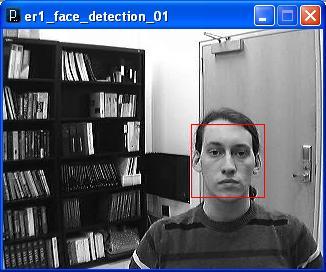
Lastly, in order to view any video with Processing, whether from a webcam or not, currently a very old plug-in called WinVIG 1.0.1 is required. Once all this stuff is installed and you’ve moved the unzipped example Open CV sketches folder provided with the library into your Processing->libraries folder you should be all set. You can hope to get something like this running in no time.

Face Detection Example

Example Face Detection Example from Processing using ER1 Webcam

hello_world

A traditional way for those of us who work with computers and robotics to test our systems is the pleasantly ubiquitous “hello world” program. This post is such a test program. Both as a way to gauge the abilities and features of the web interface I’m using to create it, and as a test of my own skills at writing and maintaining such a thing as a “blog”. Through this blog and other associated pages, I hope to exemplify some of my projects in robotics and electrical engineering, especially my masters independent research project. To those of you who have stumbled upon this first post be warned, I have not yet gained the ability to statistically predict future outcomes, and as such make no claims about the quality or extent of what is to follow. Enjoy.