Auto-generated Arduino Code: Day 1

So the moment I’ve been working toward for the past few weeks has arrived. I’ve finally started the process of having my decision tree program in Processing output generated code that can be run on the Arduino platform. In this first day I’ve made a huge amount of progress, going from nothing to having all the necessary code generated to create a function which can be run on the Arduino. What I’ve done is allow the decision tree program in processing to create a .h header file with the name of the tree as the name of the generated function. The inputs to the function are integer variables whose names are the names of the attributes used to create the tree. The auto-generated code includes comments which tell the name of the function and the date and time it was generated. Once the .h file is generated, all I have to do is use the decision tree function with the Arduino is place the generated “tree_name”.h file in the Arduino libraries folder and then add #include <“tree_name”.h> to my Arduino sketch. From there on the decision tree function will simply take in integer inputs for the attributes and output the decision as an integer which is the output level. I’ll be working to clean up all my code and examples and to run some data sets through the system for verification and to determine percent accuracy. For now I’ll leave you with some of the auto-generated code and the decision tree diagram that goes with it.

/* tennis decision Tree file for Arduino	*/
/* Date: 13 Feb 2012                        */
/* Time: 18:22:33                           */

#ifndef tennis_H
#define tennis_H

#if defined(ARDUINO) && ARDUINO >= 100
#include "Arduino.h"
#else
#include "WProgram.h"
#endif

int tennis(int Outlook, int Temp, int Humidity, int Wind){
	if(Outlook == 0){
		return 1;
	}
	else if(Outlook == 1){
		if(Wind == 0){
			return 1;
		}
		else if(Wind == 1){
			return 0;
		}
	}
	else if(Outlook == 2){
		if(Humidity == 0){
			if(Temp == 0){
				return 1;
			}
			else if(Temp == 1){
				return 1;
			}
			else if(Temp == 2){
				if(Wind == 0){
					return 0;
				}
				else if(Wind == 1){
					return 1;
				}
			}
		}
		else if(Humidity == 1){
			return 0;
		}
	}
}

#endif

Tennis Decision Tree

Basic Graphics for Decision Trees

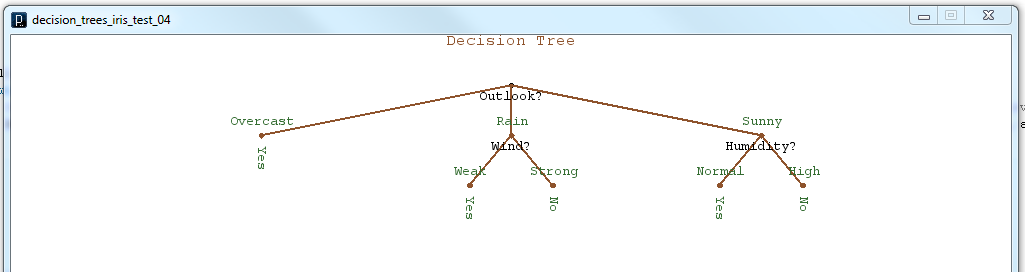
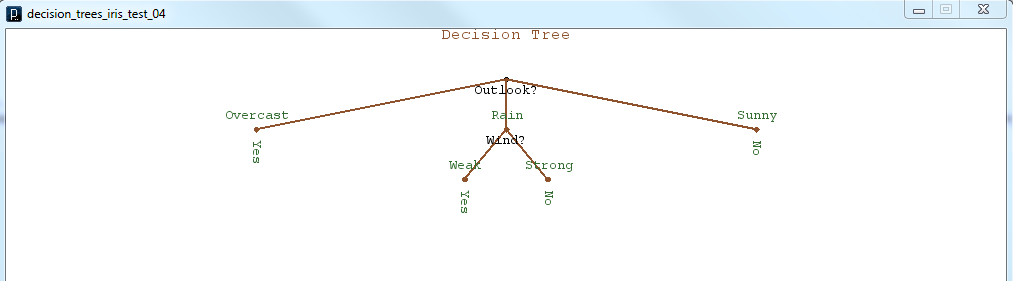
As I’ve continued to work towards making my decision tree program capable of auto-generating Arduino code, I’ve realized that it would be helpful to get a visual sense of what the decision tree structure looks like. By producing some graphical representation of the decision tree I thought I would get a better understanding of how I would generate the program control structure, and where in my program to generate the if/else branches. I have learned a couple of things, first that it is difficult for a recursive structure to keep track of where in the structure it currently is, and also that Processing is very adept at making simple graphical output. In summary, I was able to use the pushMatrix() and popMatrix() functions, which are part of Processing, to save my current coordinate system on a stack before each recursive branch. This would allow each branch to behave identically to the larger tree. Also I used a very clever, at least I think it’s clever, method of storing my current node location in terms of the level number, and the branch number. This allows the tree to make decisions about how to represent and space the branches on a given node given the depth and number of other nodes at that level. Here are a couple of teaser images of the graphical output.

decision tree graphic 2decision tree graphic 1Now that I have some basic (very basic) graphical output to represent the tree structure, I should be ready to begin the process of using the graphical tree structure to create actual Arduino code.

Adding Machine Learning to the Arduino

My eventual goal is to create a few machine object classes for use with either the Arduino or Processing or both. In general, machine learning involves processor intensive statistical calculations on very large data sets to be effective. Obviously this does not lend itself well for use on a small 8-bit microcontroller platform like Arduino. However, I believe it may be possible to do some very neat things with an Arduino based system if most of the “training” phase of a given algorithm is performed on a PC with Processing, while the implementation/reinforcement learning phase is conducted on the Arduino. If input data is limited to analog/digital sensor readings, a very simple open-source robot with the ability to learn may be possible.

I plan to do my best to implement some form of decision tree (supervised learning), Q-learning (reinforcement learning) and K-nearest neighbors (unsupervised learning) algorithms, starting with the decision tree.

To begin with I plan to design/test my algorithms with Matlab to speed development, then translate the code into either Processing or Arduino as the case may warrant.