Auto-generated Arduino Code: Day 1

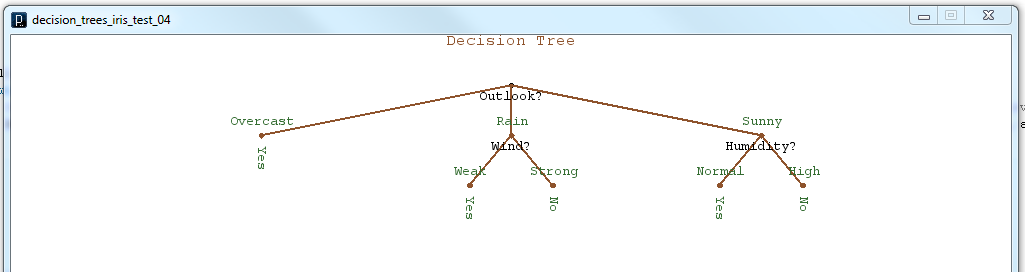
So the moment I’ve been working toward for the past few weeks has arrived. I’ve finally started the process of having my decision tree program in Processing output generated code that can be run on the Arduino platform. In this first day I’ve made a huge amount of progress, going from nothing to having all the necessary code generated to create a function which can be run on the Arduino. What I’ve done is allow the decision tree program in processing to create a .h header file with the name of the tree as the name of the generated function. The inputs to the function are integer variables whose names are the names of the attributes used to create the tree. The auto-generated code includes comments which tell the name of the function and the date and time it was generated. Once the .h file is generated, all I have to do is use the decision tree function with the Arduino is place the generated “tree_name”.h file in the Arduino libraries folder and then add #include <“tree_name”.h> to my Arduino sketch. From there on the decision tree function will simply take in integer inputs for the attributes and output the decision as an integer which is the output level. I’ll be working to clean up all my code and examples and to run some data sets through the system for verification and to determine percent accuracy. For now I’ll leave you with some of the auto-generated code and the decision tree diagram that goes with it.

/* tennis decision Tree file for Arduino	*/
/* Date: 13 Feb 2012                        */
/* Time: 18:22:33                           */

#ifndef tennis_H
#define tennis_H

#if defined(ARDUINO) && ARDUINO >= 100
#include "Arduino.h"
#else
#include "WProgram.h"
#endif

int tennis(int Outlook, int Temp, int Humidity, int Wind){
	if(Outlook == 0){
		return 1;
	}
	else if(Outlook == 1){
		if(Wind == 0){
			return 1;
		}
		else if(Wind == 1){
			return 0;
		}
	}
	else if(Outlook == 2){
		if(Humidity == 0){
			if(Temp == 0){
				return 1;
			}
			else if(Temp == 1){
				return 1;
			}
			else if(Temp == 2){
				if(Wind == 0){
					return 0;
				}
				else if(Wind == 1){
					return 1;
				}
			}
		}
		else if(Humidity == 1){
			return 0;
		}
	}
}

#endif

Tennis Decision Tree

Basic Graphics for Decision Trees

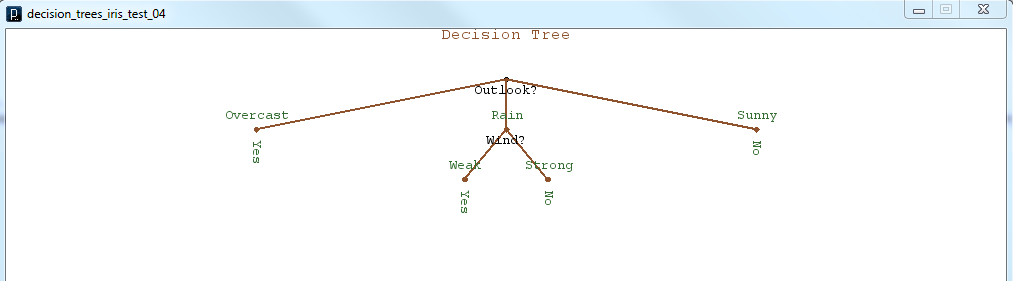
As I’ve continued to work towards making my decision tree program capable of auto-generating Arduino code, I’ve realized that it would be helpful to get a visual sense of what the decision tree structure looks like. By producing some graphical representation of the decision tree I thought I would get a better understanding of how I would generate the program control structure, and where in my program to generate the if/else branches. I have learned a couple of things, first that it is difficult for a recursive structure to keep track of where in the structure it currently is, and also that Processing is very adept at making simple graphical output. In summary, I was able to use the pushMatrix() and popMatrix() functions, which are part of Processing, to save my current coordinate system on a stack before each recursive branch. This would allow each branch to behave identically to the larger tree. Also I used a very clever, at least I think it’s clever, method of storing my current node location in terms of the level number, and the branch number. This allows the tree to make decisions about how to represent and space the branches on a given node given the depth and number of other nodes at that level. Here are a couple of teaser images of the graphical output.

decision tree graphic 2decision tree graphic 1Now that I have some basic (very basic) graphical output to represent the tree structure, I should be ready to begin the process of using the graphical tree structure to create actual Arduino code.

Loading Data into Processing

For the past couple of days I have been doing my best to use other data that has been collected and analyzed with commercial software, like Matlab, to verify if my decision tree program is working. One common data set that is often used is something called the Fisher’s Iris Data. This data set is useful because it has been analyzed with many different algorithms and methods over the years and also because it is the example set used in the Matlab Statistics Toolbox Classification Tutorial. I will go further into how I used this data set to test my decision tree in an upcoming post. One problem with using a data set like Fisher’s Iris Data is that there are over a hundred data points for each of several factors; these take a long time to type into an array, as is required by my basic decision tree program. In Matlab a simple command like “load fisheriris” is all that is needed to load the whole data set into a collection of arrays. I wanted to find a way to do something similar with my program that would allow data to be collected and manipulated in Excel or Matlab or a simple text editor and then loaded directly into the program. There are surely multiple ways to handle this problem but I’ve got a simple solution that uses a combination of the Processing function loadString() as well as a simple method to convert arrays of Strings to arrays of Integers as described on  Manikandan’s Weblog. Enjoy the example:


// Each Processing Sketch requires a setup() and draw() function, this is the setup()
void setup()
{
  // Basic Processing setup codes
  size(640, 360);           // Create window of size 640 by 360 pixels
  background(0);            // Make window background color black
  stroke(255);              // Make stroke (line) color white
  noLoop();                 // Don't repeat (loop) the draw() fucntion

  // Load a text file with separate values (just an integer number) on each line
  // into an array of Strings, which each value in its own String
  // 100.txt contains the number 1 to 100, each on its own line
  String[] dataString = loadStrings("100.txt");
  // Print how many lines the file contained
  println("there are " + dataString.length + " lines");
  for (int i=0; i < dataString.length; i++) {
    // Print each line or number String
    println(dataString[i]);
  }
  println();             // Add a blank line to the command line ouput

  // Use custom function convertStringArraytoIntArray to convert each
  //String in an array of Strings to an integer in an array of integers
  int[] dataIntArray = convertStringArraytoIntArray(dataString);
  // Print how many numbers are in the array
  println("there are " + dataIntArray.length + " numbers in array");
  for (int i=0; i < dataIntArray.length; i++) {
    // Print each number in the array
    println(dataIntArray[i]);
  }
  println();             // Add a blank line to the comand line output
}

// Each Processing Sketch requires a setup() and draw() function
// We're not using the draw function, so we leave it blank
void draw()
{
}

// Custom Function that takes an array of Strings
// and returns an array of integers
public int[] convertStringArraytoIntArray(String[] sarray) {
  // If the array of Strings is not empty or NULL then process it
  if (sarray != null) {
    int intarray[] = new int[sarray.length];
    // Create int array with elements for each String in String array
    for (int i = 0; i < sarray.length; i++) {
      // For each String in String array, use parseInt to get integer
      intarray[i] = Integer.parseInt(sarray[i]);
    }
    return intarray;      // Return the interger array
  }
  return null;            // If the String array was null, return null
}

Decision Tree Recursion Begins

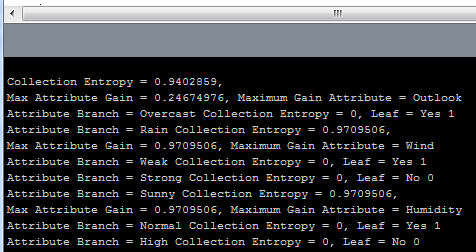
So today the decision tree took its first gasping and labored breath and lived! What I mean, is that today I finished all the basic guts to make the implementation of my algorithm recursive. (If you don’t know what recursion try searching google for recursion). Recursion is the handy and sometime mind-bending ability of a computer program function, method or object to call/invoke itself from within itself! This ability is very useful because often times an operation that needs to be performed on one block of data is the same as that which is necessary to be performed on each sub-block of data. Therefore the function keeps calling itself until it gets down to the smallest sub-block of code it can process, then after it finishes the next block up the chain uses its results and so on, until the whole thing is wrapped back up at the top. Inherently decision trees (and just about any sort of software tree structure, and even some real trees) can be recursive, because their branches are basically just smaller trees themselves. The decision tree algorithm makes smaller decision trees using recursion until it finds a node with 0 entropy  (which means the outcome is totally determined at that node) called a leaf. In such a way a single object, Decision Tree, can build itself from the leaf nodes back up to the trunk or root node. So far my tree has no fancy output or graphical display and is not commented or ready for public viewing, but as I clean it up and get it interacting with the Arduino I’ll post the polished source. For now here’s a teaser of the command line debug feedback showing the tree at work.

Decision Tree example Command Line Output
Processing Command Line Output Showing Entropy, Information Gain and Leaf Nodes of Decision Tree